Text Adventure Mode is pushed back to Prototype 5-3
Yes, you read that right. I have decided to move the Text Adventure optional quest to Prototype 5-3. It will not be making an appearance in Prototype 5-2.
My reasoning for this goes thusly: I have about two weeks to finish everything for the prototype, maybe a few more days (I update on Mondays but I don’t have to release on them). I could rush this out, but I’d rather spent those two weeks polishing the game and improving it. It’s better to get all this polish and balance work done rather than release in a shoddy state but with more content.
For reference, this is due to A) the GUI and B) the increased length of the Tellurium Mines. Originally, the mines were just the randomly generated levels plus a small Steam Droid encampment where you could turn in quests and chat with NPCs. The Tellurium Mines is now a full-fledged side area, with a Steam Droid city, about a dozen cutscenes, a small dungeon, the random level generation, and new areas added around Regulus. It’s much better than before and really suits the story’s themes, but holy cow did the scope expand.
If I have spare time, I may try to squeeze the gemstone upgrade system into this prototype, but that depends on how long I spend on everything else. I have a few maps I need to finish and I have to write a few more scenes, as well as fix some bugs in the random level generator, but it’s mostly POLISH WORK.
If you are interested, please tell me what parts of Chapter 1 I should focus on. I want to redo some of the older maps. Which maps did you think sucked the most? Those are the ones I’ll redo or expand.
Boring Update Stuff
As far as programming goes, see above. It’s mostly polish work from here on out. Because I changed how the program handles naming, I have to go back through Chapter 1 and fix various objects now showing up with improper names, such as (Thought: when reading the signs.
On the art front, everything I had mandated for Prototype 5-2 is in. Everything past this point is nice-to-haves. I’d really like to get Darkmatter and Steam Droid Christine images into this prototype if we have time. Chicken is on vacation until the 18th, meaning there’s juuuust enough time to get those out.
The new UI is artistically completed, and all I have to do is code it in.
On the spriting front, I am currently forcing Urimas to revamp some of the older tiles to make them look better. He just finished trees, and we’re doing boulders next.
Checklist
As you can see, we’re mostly done. Just gotta balance these things and revisit old code to address bugs.
Serenity Crater (Reviewing Balance)
Tellurium Mines (Mostly Done)
Golem Transformation images (Done)
Latex Drone Transformation images (Done)
Enemies for Serenity Crater (Done)
All running animations completes (Done)
New UI Overhaul (Done, Implementing)
Eldritch Dream Girl Transformation (Complete)
Work Credits System implemented and balanced (In Progress)
Now, what does this mean? It means OSX users may be in a tight spot, though probably not immediately. Those of you who are OSX users already know that Apple hasn’t been updating its support past OpenGL 4.1.
Pandemonium runs on OpenGL, though fortunately it does not require any of the advanced features in the later versions. Apple is deprecating support, but OSX should still run the game just fine unless they intentionally drop support at some point.
So, if you’re an OSX user, here’s the state of things: Until Apple completely drops OpenGL support (which is not a given), you will be able to play Pandemonium natively. If/when they do drop it, you won’t unless you deliberately block system updates.
I expect Apple, being monopolistic idiots, are still not dumb enough to deliberately drop support for years to come. As such there is a good chance that this will not affect Pandemonium, though it will definitely put a chill on further development on OSX. After all, why should I bother optimizing it if all my work might be lost?
The primary reason I decided to build the engine in OpenGL was its cross-compatibility. OpenGL can work on any system anywhere because it’s an open standard. Anyone can write an implementation. Windows, OSX, Linux, they all work with OpenGL. Apple is now pushing their new graphics library, Metal, in place of OpenGL in an attempt to gate off content and force users to buy macs in order to play specific games.
As an indie developer, I don’t have the kind of resources to overhaul all of the code for Metal, with the attendant bug fixing and feature changes that go with it. The only reason we currently have an OSX build (and soon, a Linux build) is because there’s not that much coding in porting it when they use the same graphics API. Forcing the usage of Metal removes that advantage.
Again, I don’t think this will affect Pandemonium itself unless Apple does something amazingly shotgun-to-foot stupid (you know, in addition to this current shotgun-to-foot stupid action). But it does bring a few things into focus.
Apple is a big company, and they received billions in tax cuts recently. They can certainly afford to maintain their OS support for OpenGL. This is pure monopolistic money-grabbing. Further, this is an example of a major corporation taking a unilateral action which will make the industry and the science of computing worse. I’m sure there are advantages to Metal, but kicking independents artists in the teeth like this slows down the generation of culture. Scientific applications on OSX will also be affected since OpenGL is very commonly used there (disclosure: I am a BSc in Geology, I’ve used such applications).
And of course, because of the structure of American capitalism and its total lack of anti-trust enforcement, we, the public, have absolutely no input on this. Apple may or may not make lots of money, but we will suffer for it. Our overlords decide and we have no voice.
If you’re an OSX user, hopefully WINE will continue to suffice for your purposes. You may also want to consider dual-booting to Linux as I hope to have a Linux build out for Prototype 5-3.
Update: Fortunately, there is some good news. Despite Apple’s intransigence, Vulkan support is on OSX. So, I may just provide Vulkan support to thumb my nose at Apple, and we’ll have a Pandemonium that will be compatible for future OSX users.
So, we’re most of the way through the Tellurium Mines. My goal is to have that wrapped up this week, along with Serenity Crater. As is so often the case, we’ve expanded the area a little bit to make it better. It now features a mini-dungeon and some other surprises that I’m not going to spoil, in addition to having a large NPC town and randomly generated dungeon. And all this for an optional area!
I’ve also settled on the equipment upgrade system we’re going to be using. I spelled it out here but, in brief: Equipment can be socketed with items (tentatively called gems) which provide stat increases. Gems can be upgraded with adamantite. You can swap gems out of your equipment. Some equipment has more slots than others.
This system will not make it into Prototype 5-2, but I should have it done for Prototype 5-3.
Art Stuff
Chicken just got me the last piece of art mandated for Prototype 5-2. Everything after this point is a nice-to-have but isn’t on my list of required pieces.
Hund also just finished the runic animations, which Patrons will get to see next week.
Urimas is getting me some more tiles. Because that’s what he does.
Rune is doing character design work for Chapter 2. Izuna the Kitsune is looking good!
The New UI
I’ve been promised that all the remaining UI parts will be given to me this week. I’ve coded most of the UI in as I’ve received it so far. Once it’s done, I’ll be putting up some screenshots for all to enjoy.
Please note that none of the UI is considered finalized at this point, I often edit little bits to make them look better or fit the text better. I’m considering creating an entirely new font for the headers, for example, so take all things with a grain of pepper.
Prototype 5-2 Checklist
My current target for 5-2 is the end of June. I want to spend some extra time testing and balancing the prototype, hence why I’m allocating a month for it instead of two weeks. I could very well rush it out in two weeks, but then it’ll suck. So, nope.
Right, so I’ve been thinking on this issue for a while now and I decided to compile my thoughts into a post so other people can ignore read them. Yes it’s about Pandemonium’s internal system dynamics, but I promise to keep it high level.
It also doubles as a Design with a Grain of Salt post.
The Weapon Upgrade System
To put it briefly, in Pandemonium, the player can upgrade their weapons and armor using Adamantite. Adamantite is found in the environment and can be purchased in some cases.
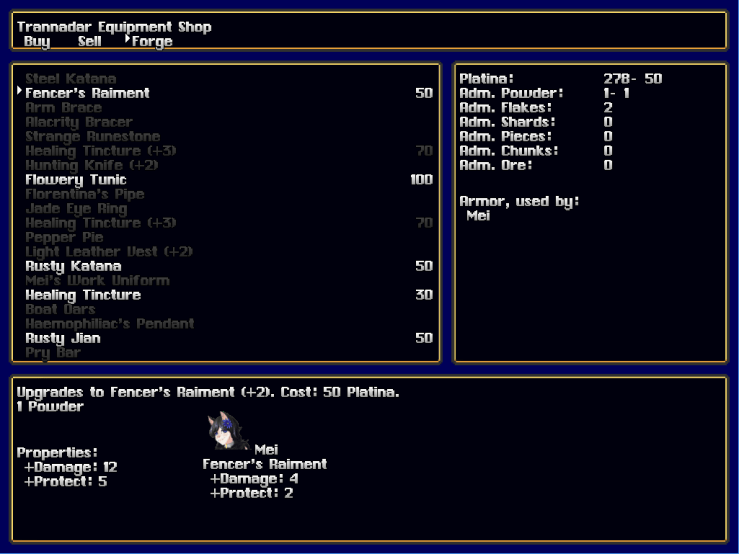
Upgrading a weapon gives it a suffix, such as Fencer’s Raiment (+1), and increases its statistics. Every piece of equipment has a different upgrade path.
(The Forge UI hasn’t been overhauled yet, 100 bonus points for the first person to spot the obvious bug!)
What it does to the game
Being able to find items in the world that you can use to improve your existing inventory produces a few obvious effects.
The player wants to seek out every treasure chest because more adamantite is always useful.
Cash is always useful. You’ll never really have too much since every character needs to upgrade their equipment.
There are fewer pieces of equipment to be found, and equipment is never discarded since no one weapon is really “better” than another when upgraded.
However, as I was developing this system I found a major downside to it that I had not considered. Highly upgraded equipment discourages the player from experimenting or specializing.
If I made a piece of equipment that has excellent fire resistance, but it’s found later in the game, no player would ever actually use it because by the time they found it, all their existing equipment is at +5. This piece of equipment gives fire resistance but unless the enemies in one area are exclusively dealing fire damage, the overall better stats of a +5 piece of equipment outweigh the increased resistance. The best case scenario would be a player upgrading the fire resistance item, using it for one area, and then putting it aside until they find another area where enemies deal fire damage which may not even exist in the game.
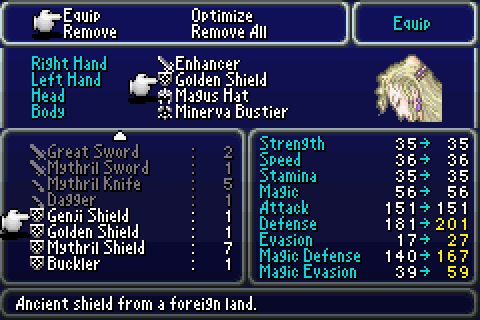
In games like Final Fantasy, your party is constantly finding new weapons and armor. There are even Optimize options on the equipment screen which instantly equip whatever has the best overall stats. This is something I wanted to avoid because it’s one of those situations where the player doesn’t get to make an interesting choice. If a piece of equipment has better stats, equip it. Duh. You don’t need to choose what to upgrade, you just need to choose to hit the Optimize button periodically.
Final Fantasy 6, GBA Version. Mash that Optimize button!
So I want to encourage experimentation and interesting player choices at the same time. How the hell do I do that? Well, I need to make things more flexible.
Possible Solution A: Recycling
This one I’ve given some thought to. Essentially it allows the player to “Recycle” an item, decreasing it back down to its (+0) state and removing all bonuses, as well as refunding all adamantite and cash that went into it.
If you want to experiment, you can take your +5 gear and downgrade it all back to its base properties, then upgrade something else. If it doesn’t work out, downgrade that gear and get all your +5 back. You don’t even need to make a new save, because there’s no real loss to doing this.
A possible lemma to this solution is that perhaps we don’t refund 100% of the cost. Some games like to do this, but as far as I’m concerned that’s just there to make the player grind for longer. If I want to experiment but it will cost me 3000 Platina to do so because that’s how much I’ll lose for recycling, then that’s 3000 Platina I need to grind (or just make a new save file and reload). So while this is a possibility, I don’t view it as a good one.
Benefits: Allows experimentation and flexibility with the equipment. Internally, Pandemonium is set up for this, as the upgrade table can just be run in reverse.
Downsides: Adds complexity to the game. Recycling is a system I need to explain to the player, and some players may skip over it just because it’s extra complexity.
Possible Solution B: Per-Slot Upgrading
Another possibility is that each character could upgrade their equipment slots instead of upgrading the equipment in that slot. Yes, that sounds insane, but from a game-mechanics standpoint it’s perfectly valid.
What this would mean is that Florentina would upgrade her weapon slot to +1, and then any piece of equipment she puts there is a +1 regardless of what it is. Swap the Hunting Knife for the Butterfly Knife, and it instantly becomes a +1.
This has a different problem in that it makes equipment sharing more difficult. If a character is upgraded and not the equipment, then characters can’t swap equipment between them. Pandemonium only has a few pieces of universal equipment in Chapter 1, but it becomes more prevalent as the game goes on. All characters have unique weapons, but armor is divided into Light, Medium, and Heavy, while Accessories and Combat-Items are much more flexible. In Chapter 6 the player can build their own party composition, so swapping equipment around becomes much more important.
Naturally, the solution to that problem is Recycling character slot upgrades, which puts us right back to Solution A but in a more convoluted fashion.
Plus, this is really weird lore-wise. I can understand making a weapon better, but somehow dusting Mei’s wrists with adamantite makes her better with her sword? How? There’s already a mechanic which makes characters stronger, it’s called Level-ups!
Benefits: Allows experimentation within a character’s equipment range.
Downsides: Discourages experimentation between characters. Weird to explain from a lore-perspective and probably convoluted to tutorialize.
Possible Solution C: Remove the upgrade system
Easiest to implement mechanically, I just remove the upgrade system and go with the Final Fantasy system. Obviously falls victim to the sunk cost fallacy since I’ve already designed and built the system and scrapping it causes me to lose all that work. (Also, if you followed that link, I do not endorse Kahneman’s evolutionary psychology hypothesis for the fallacy’s origins. That’s just flat out bad science.)
Benefits: It’s really easy. I just remove all vendors capable of forging and remove or repurpose Adamantite. Players who have it in their save file can be compensated the next time they load it. Very simple to understand, doesn’t require tutorials.
Downsides: I’d have to add a lot more equipment items to replace Adamantite. Probably need to add an Optimize button to the equipment screen.
Possible Solution D: Go Full Ham on the upgrade system
Rather than allowing multiple pieces of equipment, the player only ever gets one piece (Ex: Mei’s Rusty Katana and Work Clothes) and doesn’t find new ones. Instead, all equipment changes are done via the upgrade system.
The upgrade system no longer needs to be done in shops and no longer costs money. Instead it may look something like this awful prototype image:
The whole hog is a whole different flavour
In this system, you can add or remove upgrades at any time by inserting/removing Adamantite from the slots. I would have an indicator on each upgrade as to how much it costs of each Adamantite type. Each upgrade can be undone and will return all of the Adamantite used, and this can be done in the field (or possibly at save points) for free.
Once again, this system is complex as all get out, and would require some explanation for the player. I’d also have to change a great deal of how the equipment is handled internally, so there’d be a lot of coding involved.
It’d also be a pain in the neck to balance properly, but that’s a trial-and-error thing.
There is also no particular reason why I could not allow multiple pieces of equipment, but it would mean I would need to create upgrade charts for a lot of items. This would allow some items, like Fencer’s Raiment, to have a lot more offensive options in their upgrade chart than something like Light Leather Vest.
Benefits: Allows for a lot of interesting choices and allows experimentation and specialization in the field.
Downisdes: A lot of coding work on my end (probably. I’m very clever.) and very complex. Would likely require a detailed set of instructions available in the game for confused players. Would require a new UI with attendant control mapping charts.
A Plea
So, that’s the state of the system and how I see it. Now, if you’ve read this far, the congratulations because you’re literate or you skipped to the end and I admire your guts for admitting it. But also, you must have some thoughts on what I should do. Want to tell me what to do?
Go to this forum and hurl your ideas at my head. Whatever we wind up deciding on, it probably won’t make it into Prototype 5-2, but will probably make it into 5-3 or Chapter 5’s full release.
I ordered all the parts for the computer I’m building, and I will have them in early June. I’m going to be dual-booting Linux and Windows on this machine, so hopefully Prototype 5-2 will have native Linux support. Hooray!
Programming Stuff
Most of the way through Tellurium Mines’ scenario. Rather than rush to complete it, I took some time to put the UI in more thoroughly.
And let me tell you, it’s worth it. The UI overhaul makes the game so much more enjoyable, if for no reason other than it’s much cleaner to look at.
It’s still a work in progress, as not all of the text/images are aligned correctly and some parts are not finished yet. But it looks so much better oh my god.
Artistic Stuff
The needed character designs for Prototype 5-2 are complete, and Chicken is finishing up the Latex Drone sequence. Everything else is a nice-to-have.
Hund is now working on making some pretty runestone animations. They look great and I’ll probably wind up posting a sample when they’re ready.
Urimas, as always, is spriting. His next task is to get me sprites of the Steam Droid characters so I can finish the cutscenes therein.
And what’s that? Rune is back to work? Yes, Rune is doing some character design work for Chapter 2 and will be making promotional materials for the big release of 5-2. Much excite!
I’m about halfway through the scenario of the Tellurium Mines. I’ve gotten the new enemies I needed for Serenity, just need one more sprite sheet and I can start balancing the area.
I would be further along the mines, but I had to spend some time putting in new UI. The new UI is now about halfway complete. Get psyched!
Artistic Stuff
There are actually three enemies that I needed for Serenity, but I’ve gotten two of them. Chicken is now going to be designing the special NPCs for the Tellurium Mines section. We’re probably going to be doing the transformation art last before Prototype 5-2 comes out.
All the combat animations that I needed are complete, and they look spectacular. Hund is now going to work on redoing the rune animations that are used in a few spots in Chapters 1 and 5. We also have new runic designs as opposed to the placeholders that were there before.
Urimas, as usual, got me sprites. Running animations are done, he’s now getting me enemy sprites and tiles.
Other Stuff
We actually got a musician to make some music for Chapter 5! He did it because Chicken is a friend of his, which is good because we sure don’t have the budget to pay for it. If you’re a patron, you’ll get to listen to it in this week’s Patron Bonus Stuff.
Prototype 5-2 Objectives
When everything is checked off, it’s release time, baby.
Coding is on schedule. I worked out the kinks in the random level generator, see below.
Art is coming along nicely. I got the combat UI two days ago and we made several improvements to the status UI. All but two of the combat animations are complete. Urimas is currently finishing item icons, and Chicken needs to get me 1 more enemy design before I can finish up Serenity Crater.
The Random Level Generator
I just finished putting together the basic exporter for the RLG. It still needs to generate useful enemy and object data, but the really complex texture mapper is complete.
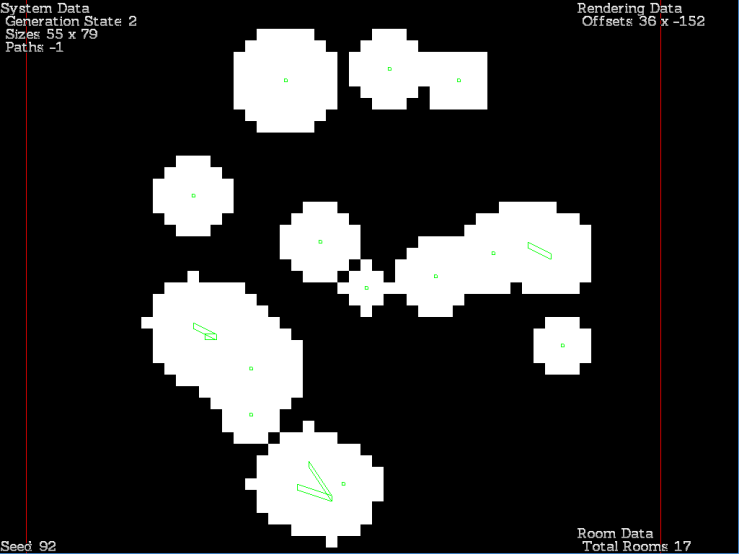
The RLG was designed to be used in both auto and manual modes, to better allow me to identify bugs. So, here’s screenshots of it in action. To use the RLG, you just press the number keys and the generator stops at each stage.
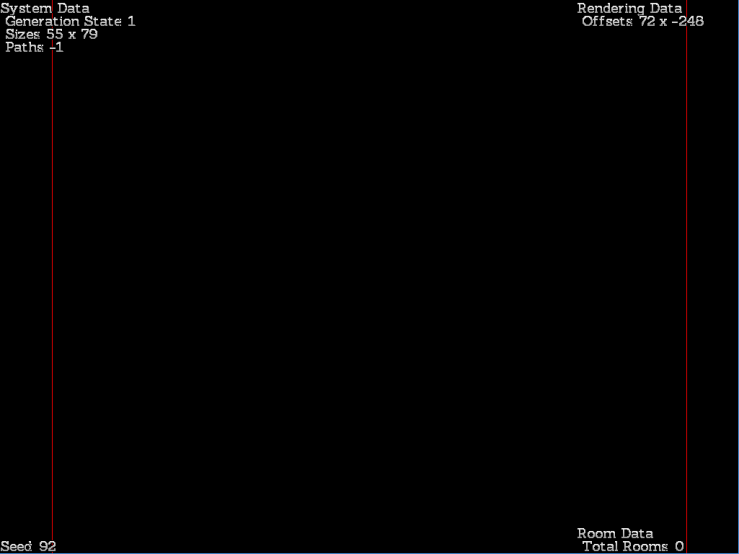
Stage 1: Rolling Sizes
Not much to look at, but the red border indicates the sizes. You can use the arrow keys to scroll around in-game.
Stage 2: Generate Rooms
Here we have generated the ‘rooms’, which are just core points. The rooms are not necessarily connected. The green dots represent a room center, and the rectangles mean a room is elliptical.
Stage 3: Tunnel and Distance Check
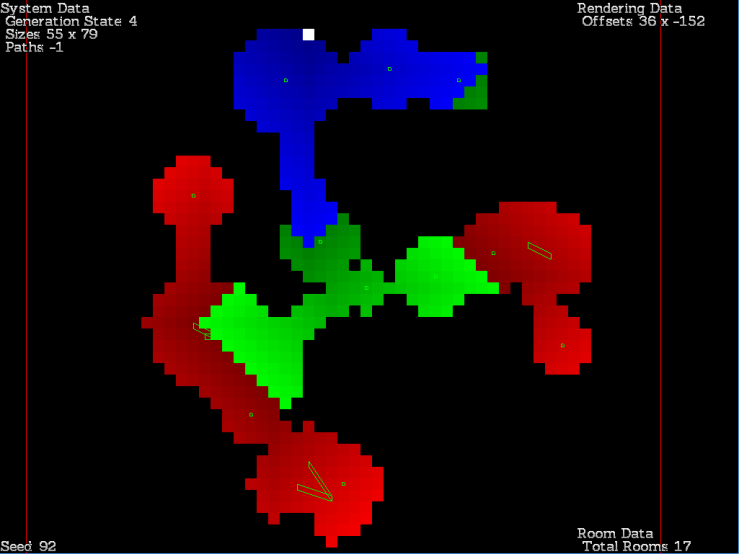
Next, we “dig” between each room. Starting at the entrance (white square) we mark all connected tiles. If a room’s center is disconnected, the closest room is found and we dig a 1-tile wide tunnel to the nearest connected room, and then run the algorithm again until no rooms are disconnected. This guarantees it’s always possible to navigate to each room.
Stage 4: Spawn an Entrance
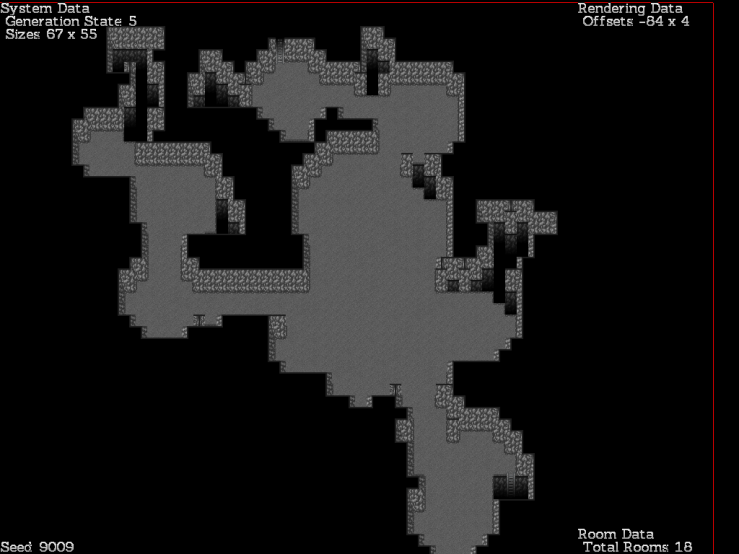
Here we have moved the entrance point to the top middle white square. This is because the entrance is always on a north wall, as it’s a ladder. An exit was also generated but is not yet marked on the map, as well as treasures being generated.
To generate the exit, we take a position that is 75% or more of the maximum distance away from the entrance ladder and modify it to be an exit. You’ll see it on the screenshot below.
To generate treasures, we find the shortest path between the entrance and the exit. The exit is in the bottom middle. Then, we take all locations on the map that are 17 or more tiles away and make them treasure candidates.
Treasure candidates are selected with weight being placed on the most distant ones from the shortest path. Sometimes a candidate is picked that is closer, but it’s usually an edge tile. Then, we find the shortest path between the treasure and the entrance-exit axis and mark it, and then find the distance for all tiles and this new, branching path. Then we run the algorithm again until there are no more tiles that are 17 or more spaces away from any path. The result is the above diagram.
Stage 5: Texture Everything
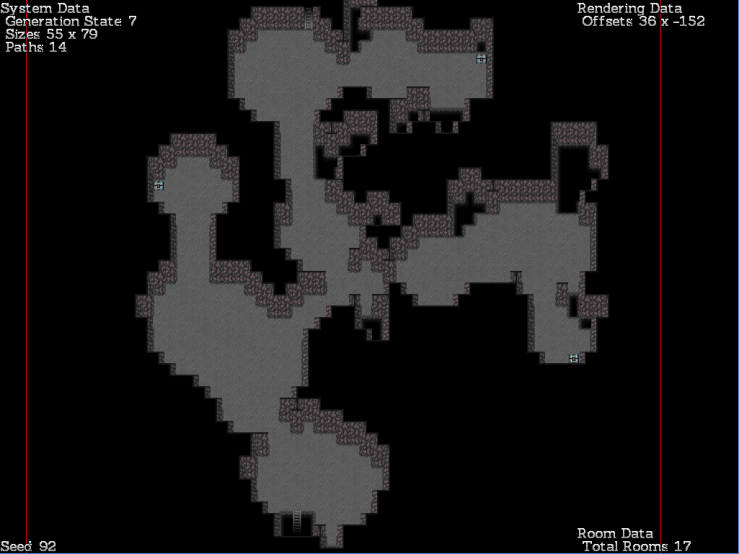
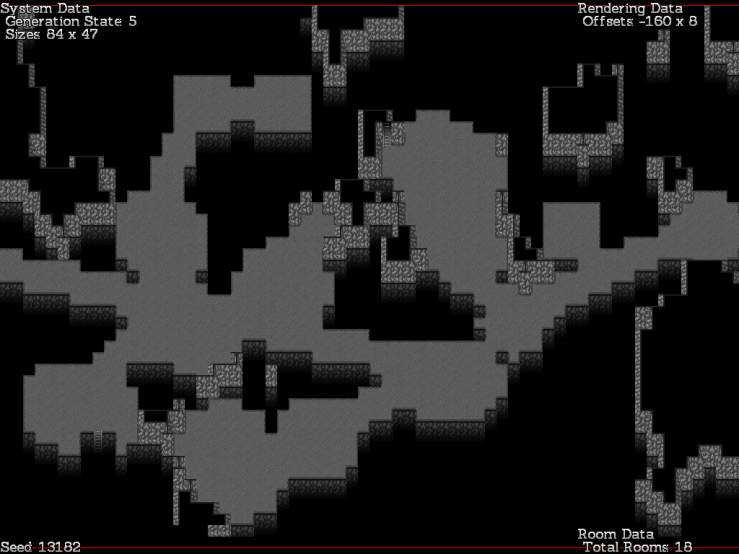
Programmatically the most complex part, the program checks pit, wall, and floor values and assembles texture data for the renderer. Now you can see how it’s an actual level with pits and walls. Presently the RLG does not place interesting objects and doodads, but it will later.
Stage 6: Generate Enemies
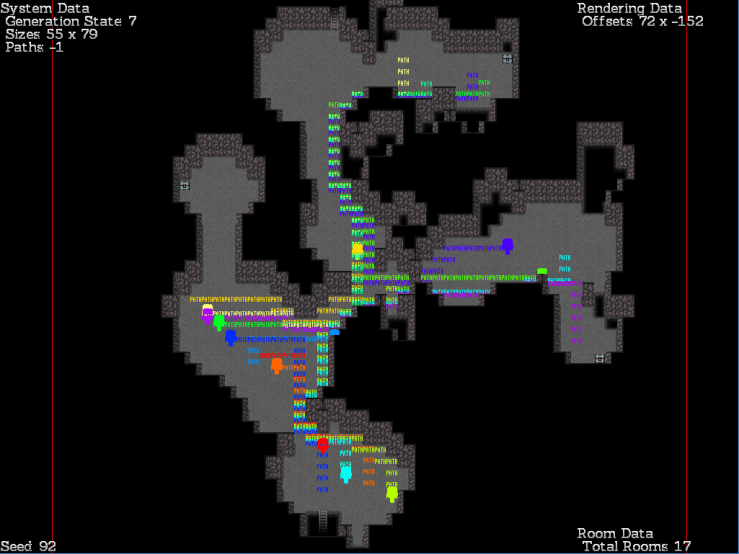
Enemies are purely object data and could theoretically be generated externally, but I decided to build their paths directly into the generator. Essentially, each room is given a priority value and enemies are rolled to spawn in each room. Each time a room gains an enemy spawn, it decreases in priority. The enemy will then mark a path to another room selected at random, decreasing its weight as well. Thus the enemy population is distributed fairly evenly amongst the rooms with some getting little attention by sheer chance.
Note that these are path candidates, and most levels will not have a full complement of enemies. Towards the bottom of the mines, you can expect all the slots to be filled, though. Waiting around corners and ambushing isolated patrols is still the best strategy.
So that’s my random level generator. I’ve already hooked it in to the game’s engine, I just need to generate objects and then I can finish the other half of the Tellurium Mines’ scenario work.
Prototype 5-2 Objectives
When everything is checked off, it’s release time, baby.
I do so love getting sick. I only spent about three days last week actually working on Pandemonium. But here’s some of what I got done.
I have almost finished the level generator’s basic parts. It still needs to generate treasure and enemies but it currently generates entrances and exits and does so fairly naturally. The entrance is in the top middle and the exit the bottom right. Exits are generates at 75% or more of the maximum walkable distance in the map, which means I can put treasure at the 95% mark and enemies in between.
There is a 10% chance that the level generated will be a cavern. Here, pits account for most of the blockers as opposed to walls, but the other properties are exactly the same. It provides visual variation.
I do intend to put in more types of generators to give more variety, but I’ll retrofit those later. This week I will be adding treasure, enemy patrols, and then actually convert the level generator into usable levels.
Artistic Stuff
Urimas has finished the running animations and is now making tiles for the Steam Droid parts of the mines. Once I get those, working on the scenario for the Tellurium Mines is my next objective.
Hund has been working on the combat animations and should be done the main ones this week. He’s now adding coloring and shading. They look pretty darn good.
CocoMint reports that the UI has its parts complete. We’ll be going over the finalized layouts on Wednesday.
Chicken has nothing to report. Shame!
Prototype 5-2 Objectives
When everything is checked off, it’s release time, baby.
So, I’ve finished the Serenity Crater event sequence. I’m currently waiting on some images from Chickenwhite and I need to fix up some bugs in the cutscenes, but it’s playable start to finish even if there’s no enemies in the area. I’ll probably clean up the bugs and do balancing work this week.
Chicken has finished the Golem transformation images and is now working on the enemies in the Serenity Crater area. It’s not just Darkmatter Girls!
Hund is working on the last two combat animations I need for our prototype purposes. There are lots more to go, but these are for damage types that aren’t in the game yet, like Crusading and Obscuring, so we don’t need them immediately.
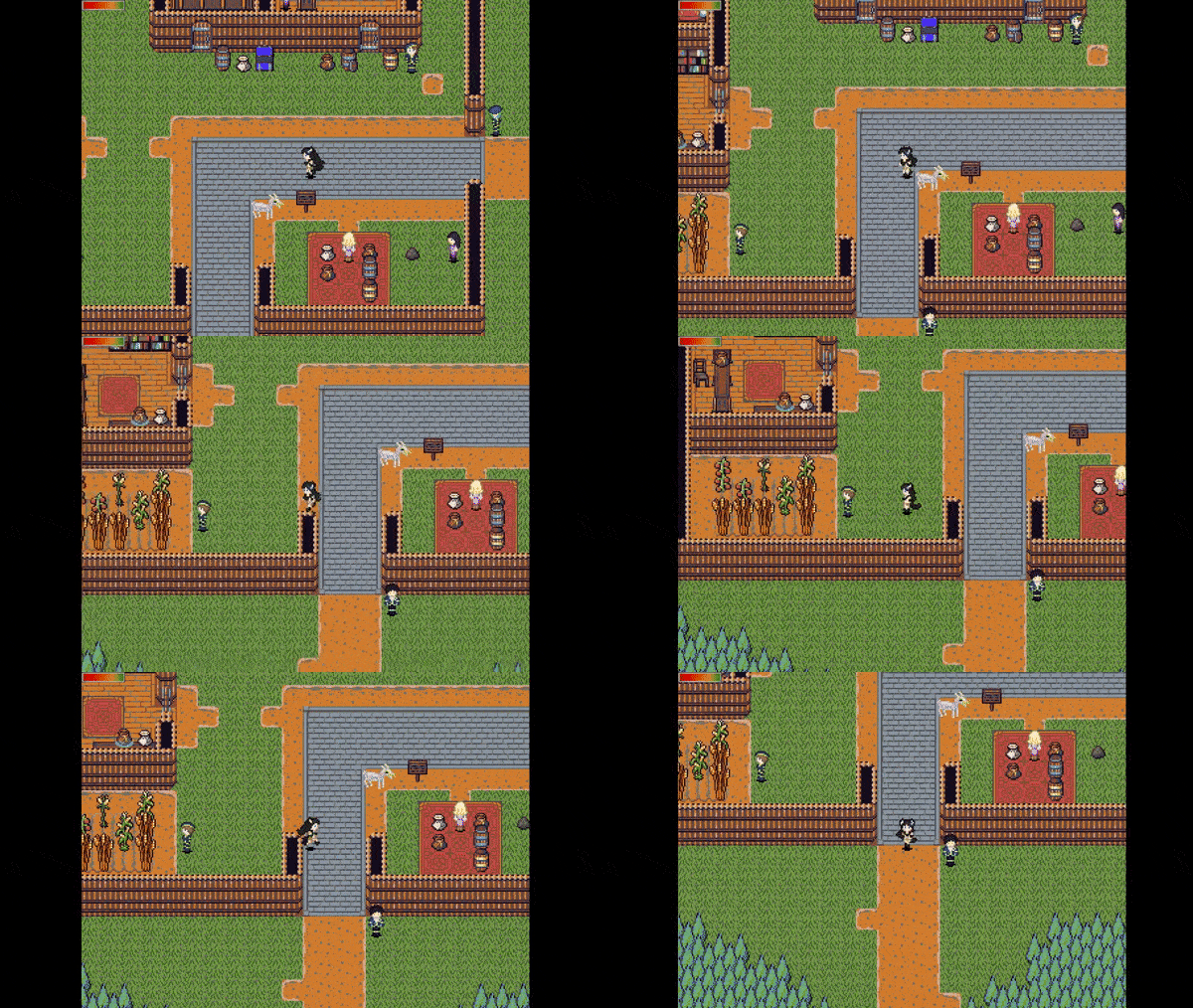
Urimas has been working on the running animations. Look below!
Running Animations
Here’s the running animations in action. Your browser will need to be able to play animated gifs, so sorry for that, some mobile users.
Urimas is most of the way done the running animations. A few of Christine’s forms need to get them still, all of Mei’s, 55’s, and Florentina’s are done. These animations will be in v1.05 and Prototype 5-2 when they come out.
Random Level Generator
So I’ve mentioned that the next thing on my work list is the Tellurium Mines. This area is unlike the rest of Chapter 5 in that it is randomly generated by floor. You’ll be doing a lot of quests and subquests in the mines for the Steam Droids, or you’ll be doing them for Regulus City for work credits. Either way, there’s lots to do in the mines.
I’ve started work on the level generator. It’ll take a lot of work to get it making nice levels, since Pandemonium can build fairly complex enemy patrol routes. I’ll probably do a Design with a Grain of Salt post on the random levels when I get a bit further along.
This is the start of the room-and-tunnel generator. The mines will have several generators to pick from, this one is fairly similar to the NetHack style of generating rooms and then linking them together.
Prototype 5-2 Objectives
Here’s what my objectives are for Prototype 5-2 and Chapter 1 v1.05. When everything on this list is checked off, it’s release time baby!
Darkmatter Girl Transformation (Text only, no images – Being Edited)
Electrosprite Transformation (Text only, no images)
Steam Droid Transformation (Text only, no images)
I’m not putting a time estimate on Prototype 5-2 at the current date, because I want to get the mines and text-adventure modules in. I had originally wanted just Serenity done, but since the Patrons voted for more significant updates, we’ll be doing all three of the side content areas for the next prototype.
What the hell is ray tracing, and what the hell is a blockmap?
Ray Tracing is the coding technique used to figure out what can be ‘seen’ from object to object. If you’ve ever played a first-person shooter, you’ve experienced a ray-tracer, because that’s how the game determines what parts of the map you can see and what parts you can’t. Objects in the foreground prevent you from seeing what’s behind them.
Ray Tracing is simply tracing a ray. A Ray is a geometry concept, it’s a line that starts from a point and travels in a direction until it hits something. In strict geometry, rays don’t hit things, but in our code they sure do.
Oh, and this would more accurately be called a ‘line-segment’ as opposed to a ‘ray’, because these have a definite end point. But since the code can be generalized to rays and ray sounds a lot cooler, I’m using ray.
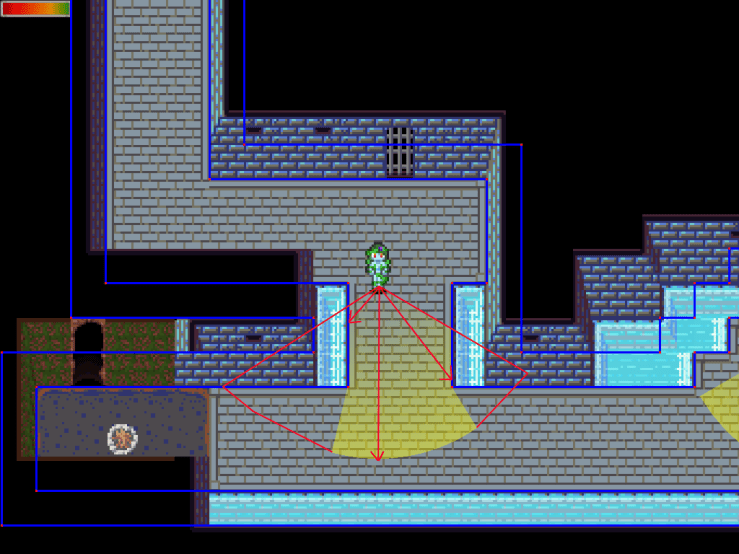
Pandemonium uses ray tracing to figure out if an enemy can see you, the player. If the enemy can, they will chase you and trigger a battle. So it makes sense that they wouldn’t be able to see you through walls unless they have x-ray vision.
In this image, I have enabled Mei’s visibility cone to simplify things. The yellow area is what she can ‘see’ while the red polygon represents what she’d be able to see if the walls weren’t in the way. The red arrows are rays, and they collide with the blue lines which represent collisions.
Pandemonium does not simulate verticality. So, enemies cannot see over the water, because they can’t chase over the water. It’s one of those design decisions that makes a lot of sense from a gameplay perspective but not from a reality perspective.
Okay, so what’s a Blockmap?
Raytracing is computationally expensive. In order to see if a given ray impacts a line, we need to run the line-intercept function. It looks like this.
I sincerely hoped you enjoyed that link.
The line-intercept function must be run for every line in the entire map against every ray you want to trace. For Pandemonium, every viewcone is about 120 rays. You can customize the accuracy in the options menu if it causes slowdown. 120 is just a good middleground number that looks nice without being too intensive.
So, if there are 600 lines in a map, and 120 rays per viewcone, then that’s 72,000 calls of the line-intercept function for every entity with a viewcone. 600 is not an unreasonable number of lines, and some of the larger maps have thousands of lines. This gets expensive, quickly.
It sure would be handy if we had a way to only check a ray against the lines it could reasonably impact, as opposed to every line on the map. The rays are short and always focused around the same spot, so an optimization would mean instead of checking against 600 lines, we check against 10.
This optimization is called a Blockmap.
What does a Blockmap look like? How does it work?
Blockmaps simply sort the lines on the map by where they are.
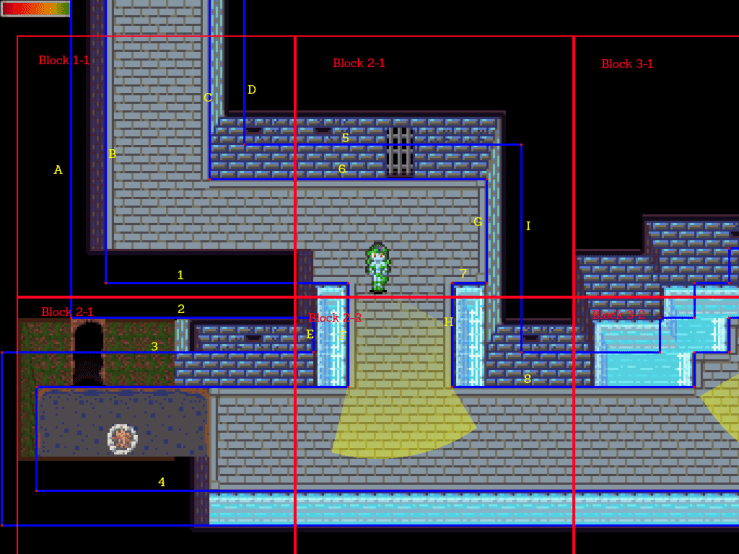
Here we can see a crude overlay which shows what a blockmap might look like. The vertical lines are labelled ABC etc, while horizontal lines are 123 etc.
Block 1-1 contains lines A, B, C, D, 1, 5, and 6. Any line which touches the block at all is considered to be within it. This can be determined with a simple line-intercept function call, and only needs to be determined once. That is, I can compile this data into the map and it never needs to change. Block 1-1 always has the same set of lines in it.
There are 16 vertical lines and 16 horizontal lines visible in this image, give or take the edges. That’s a total of 32 lines. If I had a ray that started and ended in Block 1-1, then I would only need to check 7 lines. That means the Blockmap speeds up raytracing by about 500%. Five times faster for a simple bucketing algorithm, pretty impressive!
If a ray starts in one block and ends in another block, all you have to do is check all the blocks it hits, which can again be determined via either a line-intercept function or a point comparison. Simply check which block the start point and end points are in, and check those blocks as well as any blocks between them. For a short ray like the one in this screenshot, a ray can be in as many as 3 blocks, which is still considerably faster than checking every single line on the map. The algorithm becomes faster the smaller the blocks are, up to the point where the blocks are so small that the algorithm spends too much time figuring out which blocks the ray touches and not enough checking line impacts. It’s up to the coder to figure out the optimal size, but in Pandemonium it’s about 3-4 tiles squared since the majority of collisions in the game are big square right-angles.
Bonus Optimization: Duplicate Line Check
When a blockmap gets really small, the same lines start to appear in many blocks. It’s theoretically possible for a line to be contained in dozens of blocks, though that doesn’t happen very often in Pandemonium. When iterating across the blockmaps, checking the same line twice is just a waste of speed. What do we do?
The blocks contain references to the lines, which are stored in a single master list. To prevent duplication, we can use a unique ID system.
Every time a ray begins a trace, increment a variable, called mRayPulse, by 1. Every line in the map likewise has a variable, mLastRayPulse, indicating the last pulse they were queried by. When a ray checks a line, set the line’s mLastRayPulse variable to mRayPulse. If the ray goes to check a line, and the line’s mLastRayPulse variable is already equal to mRayPulse, it was already checked and we can ignore it. Thus we avoid all duplicate line checks.
We can also optimize the algorithm a bit by shortening the ray after each impact. Finding an impact is not enough, we need to find the shortest impact, otherwise entities would still be able to sometimes see through walls. Each time the ray impacts a line, we shorten the ray. If a ray going from Block 3-3 to Block 1-1 gets hit in Block 2-2, there’s no need to continue checking Block 1-1 since it has already hit something in between. This doesn’t save much processor time but is certainly worth mentioning.
Can we optimize this more?
Yes! However, it probably isn’t necessary in this case. Blockmaps with a duplication-proof pulse checker are ideal for short rays, such as the kind used in Pandemonium. Rays that are very long, however, are a different species altogether and won’t work with a blockmap.
For very long rays, you need a tree sorting method. If you’ve ever played Doom, Quake, or Half-Life, you’ve played a game that uses one such method: Binary Space Partitioning. This is where all the lines in the level is split into two (hence the term binary) and the two halves of lines are then further split down recursively until all the lines are isolated. The more advanced methods, Quadtree and Octree, do this same technique but use a different splitter to break space into four or eight parts instead of two. The basic principle is the same, though.
A BSP has the advantage of being fast for an arbitrary set of lines and line lengths, while also not taking up much RAM. Blockmaps are very fast for short lines and take up a fairly large amount of RAM relative to their contents, but for long lines they tend to check way too many extra lines.
I will probably do a post on binary space partitioning in the future but for now, this post is long enough and got its point across.
And for all those of you who don’t care about blockmaps but made it to the end of the post anyway: Congratulations!








 Pandemonium Development